Types of post link trackers and how to avoid them

Sometimes when you share a link to a video, post, or photo, the link includes tracking details that reveal a shocking amount of data to the platform owner when your recipient opens the link, or even just when you share it, depending on where you share it. I came up with two different types of link trackers, and how to avoid one of those. We'll look at those, and then look at what they reveal, to whom, and when.

Untracked links

"Untracked" links are the same for everyone. They just refer to the content itself, with no identifying details about the sender. Some examples of untracked links:

  • https://youtu.be/Ps-8QspaBug
  • https://www.tiktok.com/@ad_em_up/video/7623830159128333599
  • https://www.instagram.com/p/DXP8AYND-6b/

The ID of the content (Ps-8Q..., 762383..., DXP...) is the same for everyone, and it's harder for Google/TikTok/Meta (in this case) to track you or your recipient. This is what you want when sharing a link to a friend.

Opaque trackers

"Opaque" trackers, such as https://www.facebook.com/share/v/1AF.../ (link censored to protect the anonymity of my mom), just have one parameter that uniquely identifies the content, but it also identifies when and who shared the video. This is kind of a nightmare to handle because you have to identify yourself in order to unmask the link.

Transparent trackers

Here's an example of a link with a "transparent tracker": https://www.instagram.com/p/DXP8AYND-6b/?utm_source=ig_web_copy_link&igsh=NTc...

You can see the static post ID (DXP8...) as well as an ugly link tracker, utm_source, but more importantly igsh=Ntc... Fun fact, this parameter used to be called igshid, which they probably shortened because it was too immature lmao. Say it a few times fast sometime though.

Another example is https://youtu.be/Ps-8QspaBug?si=dsj... The si probably stands for "share ID" and is another example of a transparent link tracker.

What they reveal (in theory)

Platform owners can glean a lot of data from people that share links from their site.

  1. Who shared it
  2. Who they shared it to (be it via IP address or worse, if the recipient is signed in to the platform, what user account opened it)
  3. When they shared it / when it was opened
  4. What kind of device they shared it from and what kind of device it was opened on
  5. What platform it was shared on, if that platform does link embedding

Link embed tracking

When you share a link on Discord, Twitter, or Signal, the link is fetched in order to extract a link preview, like this:

A link preview on Signal

So now YouTube knows (in theory) that the video was shared on Signal. This is because Signal sends a unique User-Agent string to every site it fetches that identifies itself as a Signal client.

Signal is actually a little worse about this because it uses your IP address to fetch the embed, rather than some centralized proxy like it used to do. (That proxy was getting blocked.) Discord etc fetch the link using their centralized servers, but Google (in this case) still knows the link was shared on that platform.

How to avoid transparent trackers

Identify the component of the URL that stays the same for everyone. This is usually the first part of the URL, like the Ps-8QspaBug in https://youtu.be/Ps-8QspaBug?si=dsj.... Then remove the rest. Or try Firefox's "copy clean link" context menu item, although this is not foolproof.

How to avoid opaque trackers

This is a little harder, and not always even possible. The best way, though, is to fetch the opaque link in a web browser, and see if it redirects to a transparent link. This at least works on TikTok, but I've also had some grief trying this technique on other sites, where I would either not get a new link, or it would try to get me to sign in constantly.

This is not a 24-hour clock

A 24-hour clock should cycle every 24 hours. Seems obvious right? But in a lot of apps, we get something like this:
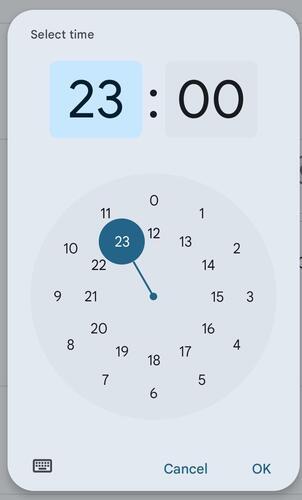
The 24-hour time picker in Google Calendar, showing 23:00 at the same position as 1:00 but in a different ring.

This is basically two 12 hour clocks jammed together. It forces you to think in lowly 12-hour terms rather than thinking about what part of the entire day cycle you need.

It gets worse too:

The "orbit" clock in the Kvaesitso launcher, which is essentially just a 12 hour clock but with 24-hour text

This is Kvaesitso's "orbit" clock when you have the system set to 24h. It's basically just a 12 hour clock with a 24 hour face. The bigger planet still has a 12 hour orbit but it displays 0-23 instead of 12-12.

What should a 24 hour clock look like? Behold, one of the few things OnePlus did right in their buggy-ass OS:

The 24-hour clock in OnePlus's built-in Clock app

0 is at the top, 12 is at the bottom, and it cycles once a day. Glorious.

Hello, world!

The site

In case you missed the footer, this is using Nikola. I wanted something lightweight and fast, so I was gonna go with Hugo, but I find Go's text/template rather annoying to work with. So I tried out Pelican briefly, but apparently it doesn't do incremental compilation very well, and that is important to me. Next I looked at Nikola and I quite like it! It does support incremental compilation (although it's kinda slow to start up, so that may not pay off for a while) and it uses Jinja which I quite adore <3

The comments

Getting comments on here was quite a journey. I wanted something that federated over ActivityPub, so I first tried Pinka but I couldn't get it to federate properly. So then I tried Leah's Mastodon-API fetching script along with GoToSocial and a read-only API key. Turns out there's a bug in that script which doesn't allow top level comments from other servers. At this point I was running out of options, so I ended up just going with Isso, which is an old Python project that just does local comments and nothing else. I really wanted federation though, but I figure this is even lower friction because it doesn't require an account.